Row-Level Security (RLS) is the mechanism PostgreSQL uses to enforce data access at the row level rather than at the table level. Where a standard GRANT controls whether a role can query a table at all, an RLS policy controls which rows that role can see or modify inside that table.
The key difference from application-layer filtering is enforcement location. RLS policies live in the database and execute as part of every query plan. An application bug that forgets to add a WHERE tenant_id = ? clause does not bypass the isolation.
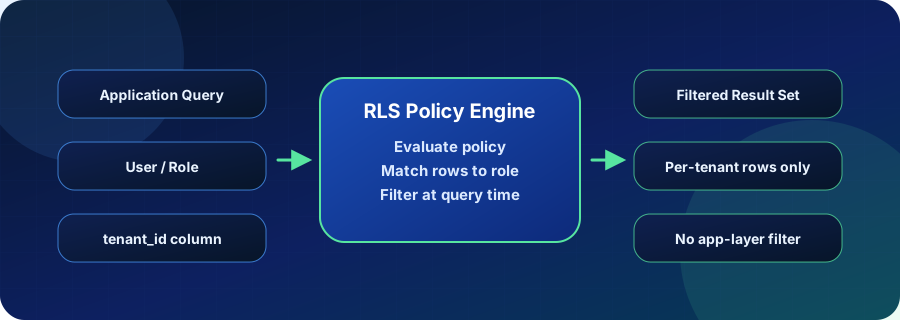
What Row-Level Security Means
Enabling RLS on a table takes two steps. First, you activate the feature on the table:
ALTER TABLE orders ENABLE ROW LEVEL SECURITY;Then you create one or more policies that define the predicate PostgreSQL appends to queries:
CREATE POLICY tenant_isolation ON orders
  USING (tenant_id = current_setting('app.current_tenant')::uuid);
The USING clause governs SELECT, UPDATE, and DELETE visibility. You can add a WITH CHECK clause to control which rows are allowed for INSERT and UPDATE. Policies can be permissive (any matching policy grants access) or restrictive (all restrictive policies must pass).
PostgreSQL applies the policy as if the predicate were added to the query’s WHERE clause. The query planner sees the policy condition and can use indexes on the filtered column, so a well-indexed RLS policy adds minimal overhead.
Where Teams Use RLS in Practice
The most common use case is multi-tenant SaaS where multiple customers share a single PostgreSQL cluster and the same physical tables. RLS lets teams use a single schema design while providing row-level data isolation per tenant, avoiding the operational complexity of schema-per-tenant or database-per-tenant architectures.
Beyond multi-tenancy, RLS appears in:
- Data governance and compliance — restrict analyst roles to anonymized or aggregated rows while application roles see the full dataset
- Shared reporting schemas — give individual departments read access only to their own records in a shared reporting table
- Audit and sensitive columns — hide salary or PII rows from roles that do not need them without splitting tables
A typical setup involves an application-level parameter — often a PostgreSQL session variable set at connection time — that the policy expression reads to identify the current user or tenant.
Test RLS policy changes in an isolated Vela branch before applying to production. Try Database Branching
Why RLS Matters for Production Postgres
Policy drift is the main operational risk. As schemas evolve, new tables may be added without RLS enabled, or existing policies may not cover new query patterns introduced by INSERT or UPDATE operations. Any table without an explicit policy defaults to allowing no rows when RLS is active — which surfaces as silent empty results rather than an obvious error.
Performance is the second concern. Policy expressions that reference a column without an index will cause a sequential scan on every query against that table. Before deploying RLS, run EXPLAIN (ANALYZE, BUFFERS) to confirm the policy condition filters efficiently.
Checklist before enabling RLS in production:
- Verify every affected table has an index on the column used in the policy expression
- Confirm superuser and table-owner bypass behavior is intentional; use
FORCE ROW LEVEL SECURITYif owners must also be filtered - Test all write operations (INSERT, UPDATE, DELETE) under the restricted role, not just SELECT
- Ensure background workers and migration tooling run under a role with appropriate access
- Document how session variables are set and who is responsible for keeping them current
How RLS Relates to Vela
RLS changes are structural: enabling the feature on a table or modifying a policy can change query results for every session connected to that database. That makes testing RLS changes in production risky.
Vela branches give teams an isolated, production-like Postgres environment for exactly this workflow. You can enable RLS on a branch copy of the production schema, load realistic data, run your application queries under the restricted role, and validate the results before the policy change goes anywhere near production.
This is useful beyond initial deployment. As schemas grow, periodic RLS audits — checking that new tables are covered, that policy expressions still use indexes, and that no role has been accidentally granted bypass — become part of routine database governance. Running those checks in a Vela branch keeps validation separate from live traffic.
Operational Checks
- Confirm RLS is enabled on all tables that contain multi-tenant or sensitive data
- Run
EXPLAIN ANALYZEon representative queries to verify policy expressions use indexes - Check that
FORCE ROW LEVEL SECURITYis set on tables where the owner should also be restricted - Test INSERT, UPDATE, and DELETE under the restricted role, not just SELECT
- Review session variable assignment logic to confirm it cannot be overridden by client code
Related Vela Reading
Start with How Vela Works, Database Branching, Branch per PR, and the Vela articles library. For adjacent glossary terms, review MVCC (Multi-Version Concurrency Control), Transaction, Lock, and Copy-on-Write (COW).