A query execution plan is the blueprint PostgreSQL generates before running any SQL statement. The planner evaluates available indexes, table statistics, join strategies, and cost estimates to decide on the cheapest path to the result — and that plan directly determines query latency.
Understanding execution plans is one of the most direct levers a PostgreSQL team has for diagnosing slow queries and validating index changes. The plan is the planner’s best guess given current statistics — and that guess can be wrong when data distribution shifts.
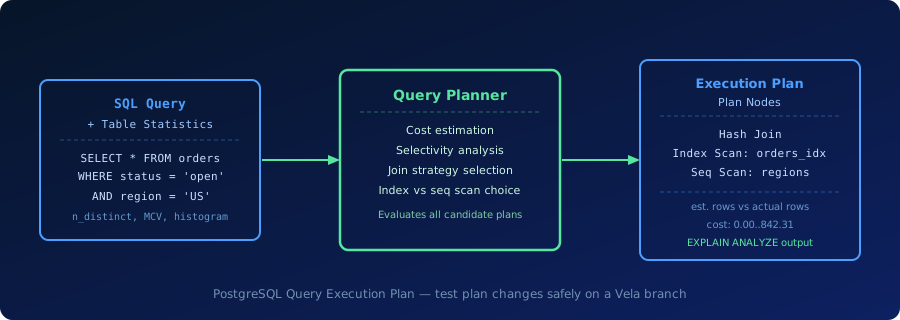
What a Query Execution Plan Shows
An execution plan is a tree of nodes. Each node represents one operation: scanning a table, applying a filter, joining two sets of rows, or sorting a result. PostgreSQL builds the plan before executing the query and exposes it via EXPLAIN or EXPLAIN ANALYZE.
Scan types indicate how PostgreSQL reads a table or index:
- Sequential Scan — reads every row in the table. Efficient when most rows match the filter; expensive when they do not.
- Index Scan — follows index entries to heap pages. Efficient for selective filters on indexed columns.
- Bitmap Heap Scan — builds a bitmap of matching page locations from an index, then fetches heap pages in order. Efficient for moderate selectivity and multi-condition filters.
- Index Only Scan — satisfies the query entirely from the index without touching the heap.
Join methods determine how PostgreSQL combines two row sets:
- Nested Loop — for each outer row, scan the inner set. Efficient when the inner set is small or accessed by index.
- Hash Join — build a hash table from the smaller set, then probe it with the larger. Efficient for large unsorted joins.
- Merge Join — join two pre-sorted inputs. Efficient when both sides are already in order.
EXPLAIN ANALYZE adds actual execution statistics: real row counts, real timing, and buffer hits. The most important diagnostic is the gap between estimated rows and actual rows. A large gap usually means stale statistics, correlated column distributions the planner does not know about, or a data skew the default statistics cannot capture.
Where Execution Plans Matter in Practice
Index validation. Adding an index does not guarantee the planner will use it. The planner only chooses an index when it estimates the index access is cheaper than a sequential scan. After creating an index, run EXPLAIN ANALYZE to confirm the plan changed as expected.
Migration testing. Schema changes — adding or dropping columns, changing data types, altering constraints — can shift plan choices. Running EXPLAIN ANALYZE on representative queries before and after a migration reveals plan regressions before they reach production.
Agent-generated queries. AI agents and ORM frameworks often generate complex multi-join queries that look correct but produce poor plans on production-scale data. Reviewing plans for these queries against realistic data volume catches problems early.
Run EXPLAIN ANALYZE against a production-scale Vela branch before applying index changes to production. Try Database Branching
Why Execution Plans Matter for Production Postgres
Stale statistics. PostgreSQL’s planner relies on table statistics collected by ANALYZE (and automatically by autovacuum). If statistics are stale — for example, after a large bulk load or a data distribution shift — the planner may choose a plan that was optimal for old data but is slow for new data.
Plan regression. A plan that was fast last month can become slow after a schema change, a new index, or a PostgreSQL version upgrade. Regressions are hard to catch without comparing plans explicitly, which is why teams use EXPLAIN ANALYZE snapshots as part of migration review.
pg_stat_statements. This extension tracks cumulative execution statistics for normalized query shapes, including total time, call count, and mean execution time. Combining pg_stat_statements with EXPLAIN ANALYZE on the slowest queries is the standard approach for identifying and fixing plan problems in production.
Execution plan problems typically show up as:
- sudden latency increases after a deploy or bulk data load
- slow queries on tables that have good indexes
- high buffer reads relative to row count
- sort or hash operations spilling to disk
Plan Node Types and When PostgreSQL Chooses Them
| Plan Node | When PostgreSQL Chooses It | Cost Implication |
|---|---|---|
| Sequential Scan | Low selectivity filter, no useful index, or small table | Linear in table size; fast per-page but slow for large filtered reads |
| Index Scan | Highly selective filter on an indexed column | Low row count lookups; random I/O cost grows with result size |
| Bitmap Heap Scan | Moderate selectivity, multi-column conditions, or multiple indexes | Better sequential I/O than pure index scan for medium result sets |
| Hash Join | Large unsorted join inputs with no useful sort order | Memory-intensive; hash table must fit in work_mem or spills to disk |
| Nested Loop | Small inner set or inner set accessed via index | Scales with outer row count times inner access cost |
| Merge Join | Both inputs already sorted on the join key | Efficient when sort is free; poor if a sort node must be added |
How Execution Plans Relate to Vela
Vela keeps standard PostgreSQL query planning intact — the same planner, the same statistics model, the same index types. What Vela adds is a production-like branch where teams can safely test plan changes without affecting live traffic.
This is directly useful for execution plan work: add an index on a branch, run ANALYZE, compare EXPLAIN ANALYZE output, and confirm the plan improvement before promoting the change to production. Because Vela branches share the same data volume and distribution as the production baseline, the plan behavior on the branch closely predicts production behavior.
For teams using database branching as part of pull request workflows, this means index changes and statistics updates get validated against realistic data as a standard step — not as a manual exercise done under pressure after a production slowdown. See How Vela Works for the broader platform model.
Operational Checks
Before relying on an execution plan analysis in a production workflow, verify the basics:
- Run
ANALYZEon the relevant tables before capturing a baseline plan. - Compare estimated rows to actual rows for every significant node in the plan.
- Test plan changes against production-scale data volume, not just a small fixture.
- Review
pg_stat_statementsfor the query’s cumulative execution history before and after the change.
Related Vela Reading
Start with How Vela Works, Database Branching, Branch per PR, and the Vela articles library. For adjacent terms, review Extended Statistics, EXPLAIN ANALYZE, Autovacuum, and Database Branching.