Performance baseline and regression testing is the practice of establishing a known-good record of query behavior and then comparing it systematically after every change that could affect the query planner. Without a baseline, teams often learn about performance regressions from users, support tickets, or monitoring alerts — after the damage is already in production.
The challenge is not capturing the baseline — PostgreSQL has the tools. The challenge is having an environment that matches production data volume and distribution closely enough that a regression caught there will reliably predict behavior in production.
What Performance Baseline Testing Means
A useful baseline has three components: the query set, the timing snapshot, and the plan snapshot.
The query set is the list of queries that matter for your application — typically the top queries by total execution time or by call frequency from pg_stat_statements. These are the queries most likely to be affected by schema or index changes and most important to protect.
The timing snapshot captures mean_exec_time, stddev_exec_time, total_exec_time, and calls from pg_stat_statements for each query fingerprint. A before-and-after diff of these values shows whether a change made queries faster, slower, or changed their execution frequency.
The plan snapshot captures EXPLAIN (ANALYZE, BUFFERS) output for the most critical queries. A plan change — switching from an index scan to a sequential scan, or from a hash join to a nested-loop join — is often the root cause of a timing regression, and comparing plans is faster than interpreting timing distributions alone.
Together these three components give you a structured regression signal rather than anecdotal “it feels slower.”
Where Performance Regression Testing Matters in Practice
Index changes: Dropping or adding an index directly affects the planner’s available strategies. Dropping an index that was used by a critical query can cause a multi-second regression. Adding an index sometimes causes regressions on write-heavy queries or when the planner chooses the new index for a query where it is slower than the previous plan.
ORM and library upgrades: Newer ORM versions sometimes generate different SQL for the same model operations — different join order, different filter structure, or different use of subqueries. The queries may be semantically equivalent but take different execution paths.
PostgreSQL major version upgrades: The planner improves across versions, but improvements to cost models and join strategies sometimes mean a plan that was efficient in PostgreSQL 14 is re-planned to a different strategy in PostgreSQL 16. Most plan changes after a version upgrade are improvements, but regressions do happen and should be caught before the upgrade reaches production.
Create a Vela branch, apply your schema change, run your query suite, and compare against baseline before merging. Try Database Branching
Why Performance Baseline Testing Matters for Production Postgres
Silent regressions: The PostgreSQL planner does not generate warnings when a plan changes. A query that previously used an index scan and now uses a sequential scan produces the same result set — just more slowly. Without a baseline comparison step in the release process, this change goes undetected until query latency degrades enough to appear in monitoring.
Index bloat after migrations: Some migration patterns — adding nullable columns, changing column types, updating large batches of rows — can trigger partial index rebuilds or change the physical structure of a table in ways that affect query performance. These effects often do not appear on a small development dataset.
Plan instability: Some queries hover near a planner tipping point where a small change in statistics, row counts, or cost parameters causes them to flip between two plans. A baseline reveals this instability before it causes on-call incidents.
Baseline Approaches Compared
| Approach | Coverage | Automation | Risk |
|---|---|---|---|
| No baseline | None — regressions detected by users or monitoring | None | Regressions reach production undetected |
| Manual timing | Spot checks on known slow queries | Low — requires engineer time per deploy | Easy to miss regressions on less-watched queries |
| pg_stat_statements snapshot diff | All queries in the workload by fingerprint | Medium — can be scripted in CI | Requires production-like data volume to catch tipping-point regressions |
| Branch-based regression testing | Full query suite against production-like data, before and after | High — branch per PR, automated benchmark and diff | Branch must mirror production data distribution to be meaningful |
How Performance Baseline Testing Relates to Vela
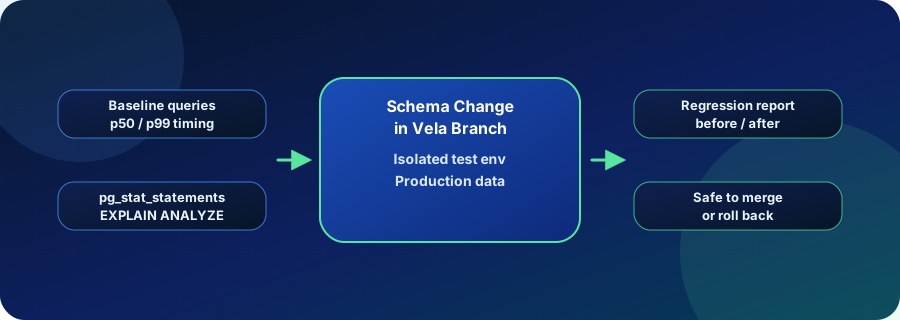
Vela branches are purpose-built for the branch-based regression testing approach. Because a Vela branch starts from production data (or a sanitized production copy), the query statistics and planner behavior in the branch reflect real-world row counts and data distributions — not the reduced fixtures that typically live in a CI database.
The workflow is: create a branch, record the baseline pg_stat_statements snapshot and critical EXPLAIN ANALYZE plans, apply the schema change or migration in the branch, re-run the query suite, and diff the before-and-after snapshots. If the diff shows a regression above your threshold, the PR does not merge. If it is clean, you have evidence that the change is safe at production scale.
This makes branch-per-PR a natural regression gate rather than just an environment for feature testing. Each pull request that touches schema or indexes gets its own performance baseline comparison before code reaches production.
Operational Checks
- Confirm
pg_stat_statementsis enabled andtrack = allif you want statement-level statistics. - Identify your top queries by
total_exec_timeand save their fingerprint hashes for baseline comparisons. - Capture
EXPLAIN (ANALYZE, BUFFERS)for your ten most critical queries as part of every release checklist. - Set a regression threshold (for example, 20% increase in
mean_exec_time) as a CI gate. - Run baseline comparisons against production-scale data, not fixtures, to catch tipping-point regressions.
Related Vela Reading
Start with How Vela Works, Database Branching, Branch per PR, and the Vela articles library. For adjacent glossary terms, review EXPLAIN ANALYZE, Query Execution Plan, Extended Statistics, and Autovacuum and Maintenance.