Extended statistics solve a specific and common PostgreSQL planner problem: the default statistics model treats each column independently. When two or more columns are correlated in practice, the planner underestimates how many rows a multi-column filter will return — and that underestimate drives poor plan choices.
CREATE STATISTICS is the standard PostgreSQL mechanism for declaring an extended statistics object. After creating one and running ANALYZE, the planner can use the richer cross-column information to improve its row count estimates for queries that filter on correlated columns.
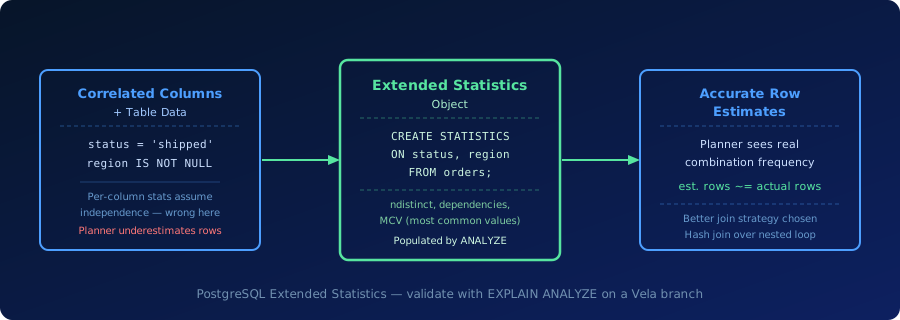
What Extended Statistics Mean
PostgreSQL collects per-column statistics automatically via ANALYZE: the number of distinct values (n_distinct), the most common values (MCV), and a histogram of the value distribution. These statistics assume each column is independent of every other column.
That assumption fails when columns are correlated. Consider an orders table where status = 'shipped' always implies region IS NOT NULL. The planner, treating the columns as independent, will multiply the individual selectivities and produce an estimate far lower than the true count.
Extended statistics address this with three kinds of cross-column information:
- ndistinct — captures how many distinct combinations of two or more columns exist. Useful for GROUP BY queries and distinct-count estimates.
- dependencies — captures functional dependencies between columns. If
cityalways determineszip_code, the planner can treat one as a proxy for the other. - MCV (most common values) — captures the most frequent value combinations across multiple columns. This is the most broadly useful kind for WHERE clause estimation.
When you run CREATE STATISTICS followed by ANALYZE, PostgreSQL builds the cross-column statistics and stores them. The planner automatically uses them when evaluating queries that match the columns in the statistics object.
Where Extended Statistics Matter in Practice
Reporting queries with date and status filters. A query like WHERE created_at > '2024-01-01' AND status = 'completed' often involves correlated columns — completed orders cluster in certain date ranges. Without extended statistics, the planner multiplies the individual selectivities and underestimates the result count, sometimes choosing a nested loop where a hash join would be faster.
Correlated enum columns. In multi-tenant or event-sourced schemas, columns like event_type and source_system may only appear in a limited set of combinations. Per-column statistics see each column separately; extended statistics capture the real combination frequencies.
Multi-tenant schemas. In a table partitioned by tenant_id, a filter on both tenant_id and subscription_tier may be highly correlated because each tenant has exactly one tier. The planner, without extended statistics, will significantly underestimate the rows that match both conditions.
Test statistics changes in a Vela branch with production-scale data before running ANALYZE in production. Try Database Branching
Why Extended Statistics Matter for Production Postgres
Plan degradation from bad estimates. When the planner underestimates rows, it tends to choose join strategies optimized for small inputs — typically nested loops — and underallocates work_mem for sort and hash operations. The result is a query that looks fine on a small test dataset but degrades significantly at production scale.
Large row count misses. A ten-times underestimate can cause the planner to choose an index scan where a sequential scan would be faster, or a nested loop where a hash join would process millions of rows more efficiently. Extended statistics close this gap by giving the planner accurate combination frequencies.
Statistics maintenance. Extended statistics objects need the same maintenance as per-column statistics: ANALYZE must run after significant data changes for the statistics to remain accurate. Autovacuum handles this automatically for standard statistics; extended statistics are included in the same ANALYZE pass, so they stay current as long as autovacuum is keeping up.
Standard vs Extended Statistics vs Partial Indexes
| Mechanism | What It Improves | When to Use It |
|---|---|---|
| Standard column statistics | Single-column selectivity estimates | Always collected automatically; sufficient for independent columns |
| Extended statistics | Multi-column row estimates for correlated filters | When EXPLAIN ANALYZE shows large estimated-vs-actual row gaps on multi-column WHERE clauses |
| Partial index | Query performance and index size for filtered subsets | When a large fraction of queries filter on the same condition and a full index is wasteful |
Extended statistics improve planner estimates; they do not add an index path. A partial index adds an actual access path but does not help row estimation for the general case. Both can be relevant to the same query, and they solve different problems.
How Extended Statistics Relate to Vela
Vela preserves standard PostgreSQL statistics behavior, including extended statistics. The planner, ANALYZE, CREATE STATISTICS, and EXPLAIN ANALYZE all work exactly as they do in any Postgres deployment.
The Vela-specific value is in the testing workflow. Adding extended statistics to a production table and running ANALYZE is a safe operation, but verifying that it actually improves plan quality requires production-scale data and realistic query patterns. A Vela branch gives teams exactly that: a production-like environment where they can create statistics objects, run ANALYZE, and compare EXPLAIN ANALYZE output — without touching live traffic.
For teams using database branching as part of pull request and migration workflows, this means statistics changes get validated as a standard step rather than as a post-incident fix. See How Vela Works and EXPLAIN ANALYZE for the broader context.
Operational Checks
Before relying on extended statistics in a production workflow, verify the basics:
- Run
EXPLAIN ANALYZEon the affected query before creating statistics to establish a baseline estimated-vs-actual row comparison. - Create the statistics object, run
ANALYZE, and runEXPLAIN ANALYZEagain to confirm the estimates improved. - Test against production-scale data, not a small fixture — estimation errors only become plan-changing at realistic row counts.
- Monitor
pg_statistic_extto confirm statistics objects exist for the columns that matter.
Related Vela Reading
Start with How Vela Works, Database Branching, Branch per PR, and the Vela articles library. For adjacent terms, review Query Execution Plan, EXPLAIN ANALYZE, Autovacuum, and Database Branching.