Deadlock detection and prevention is one of the more misunderstood areas of PostgreSQL operations. A deadlock is not a bug in the database engine — it is a signal that two or more transactions are competing for the same locks in incompatible orders, and PostgreSQL had to pick a victim to break the cycle.
The practical lesson is that deadlocks rarely disappear on their own. Retry loops can mask the problem, but the underlying ordering inconsistency will keep producing deadlocks under load. The fix belongs in the application’s transaction logic.
What a Deadlock Is
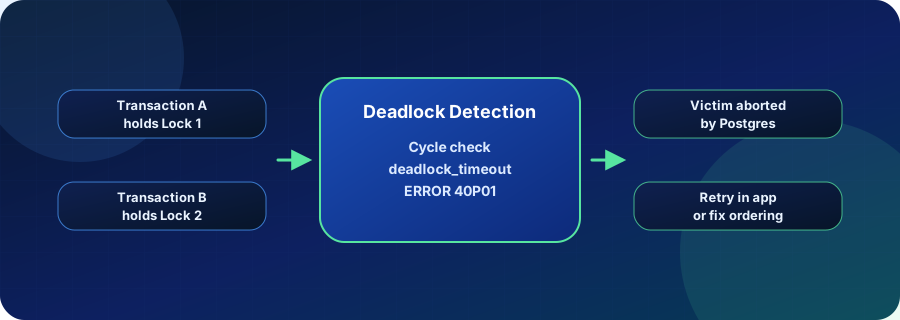
A deadlock forms when Transaction A holds Lock 1 and waits for Lock 2, while Transaction B holds Lock 2 and waits for Lock 1. Neither can proceed. PostgreSQL’s lock manager detects this cycle using a wait-for graph after deadlock_timeout (default: 1 second) has elapsed.
Once a cycle is confirmed, PostgreSQL selects a victim — typically the transaction that has done the least work — and aborts it with ERROR 40P01: deadlock detected. The surviving transaction’s locks are released, and the remaining transactions can continue.
The deadlock_timeout setting controls how long PostgreSQL waits before running the cycle detection algorithm. Lower values catch deadlocks faster but add overhead on systems with high normal lock contention. In most production configurations the default 1-second value is a reasonable starting point.
Where Deadlocks Appear in Practice
Deadlocks tend to cluster around a few patterns:
- Bulk update patterns: Scripts that update large sets of rows without a consistent ORDER BY clause allow two concurrent runs to collide when they reach overlapping rows in opposite order.
- Queue consumers: Multiple workers dequeuing jobs from a shared table can deadlock when they each lock a job record and then attempt to update a shared counter or state table in the same transaction.
- Multi-tenant writes: Applications that update multiple tenant-scoped rows inside one transaction can deadlock when tenant IDs are processed in arbitrary order.
- ORM-generated transactions: ORMs that issue multiple UPDATE statements in one transaction often do not guarantee a consistent row-level lock order.
The common thread is inconsistency in the sequence of lock acquisition across concurrent transactions. Identifying which rows or tables are involved is the first step — pg_locks and the DETAIL section of the ERROR 40P01 message both point to the conflicting processes.
Reproduce deadlock scenarios in a Vela branch with production-like data to test fixes before deploying. Try Database Branching
Why Deadlock Detection Matters for Production Postgres
Deadlocks that surface in production carry secondary risks beyond the aborted transaction itself:
- Retry storms: Application-level retry logic that does not include backoff can replay the same conflicting transaction mix, causing repeated deadlocks that slow the whole system.
- Cascading failures: A deadlocked transaction holds locks for up to
deadlock_timeoutbefore PostgreSQL intervenes. Under high concurrency, queued lock waiters can accumulate and create latency spikes. - Silent data inconsistency: If the application does not check for ERROR 40P01 and re-applies only part of the original operation, it can write partial results.
Monitoring pg_stat_activity for long-lived lock waiters and tracking the rate of ERROR 40P01 errors in application logs are the two most reliable early-warning signals.
Deadlock Prevention Strategies Compared
| Approach | What it handles | Risk | Best fit |
|---|---|---|---|
| Lock wait timeout (lock_timeout) | Aborts a transaction that waits too long for any single lock | Does not detect cycles; may abort legitimate long waits | Protecting interactive queries from stalls |
| Deadlock detection (deadlock_timeout) | Detects and breaks actual deadlock cycles by aborting a victim | Victim transaction is rolled back; application must handle ERROR 40P01 | Default PostgreSQL protection for all workloads |
| Application-level retry | Retries the aborted transaction after a brief backoff | Masks the root cause; can amplify contention if ordering is not fixed | Short-lived transactions with low collision probability |
| Consistent lock ordering in code | Prevents cycles from forming in the first place | Requires code review and discipline; harder to enforce in ORMs | Bulk updates, queue consumers, multi-tenant writes |
How Deadlock Detection and Prevention Relates to Vela
Deadlocks are notoriously difficult to reproduce on demand. The exact transaction timing, data state, and concurrency level that triggered the original deadlock rarely appear in a development environment with synthetic fixtures.
Vela branches let teams create a production-like Postgres environment from real or sanitized production data, then replay concurrent workloads that match the original scenario. Engineers can test lock ordering fixes, adjusted deadlock_timeout values, or schema changes — such as adding SELECT FOR UPDATE SKIP LOCKED to a queue consumer — in the isolated branch before promoting any change to production.
That workflow closes the gap between “we saw a deadlock in prod” and “we confirmed the fix works at production scale.”
Operational Checks
- Review
pg_locksandpg_stat_activityfor persistent lock waiters before and after schema changes. - Ensure all bulk update queries include a consistent
ORDER BYclause or are wrapped in advisory locks. - Check application error handling for ERROR 40P01 and verify retry paths include exponential backoff.
- Test queue consumer transactions with
SELECT FOR UPDATE SKIP LOCKEDto avoid competing for the same job rows. - Confirm
deadlock_timeoutandlock_timeoutare tuned for your concurrency profile in production.
Related Vela Reading
Start with How Vela Works, Database Branching, Branch per PR, and the Vela articles library. For adjacent glossary terms, review Lock, Transaction, Isolation Level (Transaction Isolation), and Database Branching.