Database branching is the database equivalent of giving every change its own safe workspace. Instead of sharing one staging database or waiting for a full dump-and-restore cycle, a team can create an isolated Postgres branch, test a change, and discard or keep the result.
The important shift is not only speed. Database branching changes the operating model around schema changes, test data, QA, and incident rehearsal because the database environment becomes disposable and production-like at the same time.
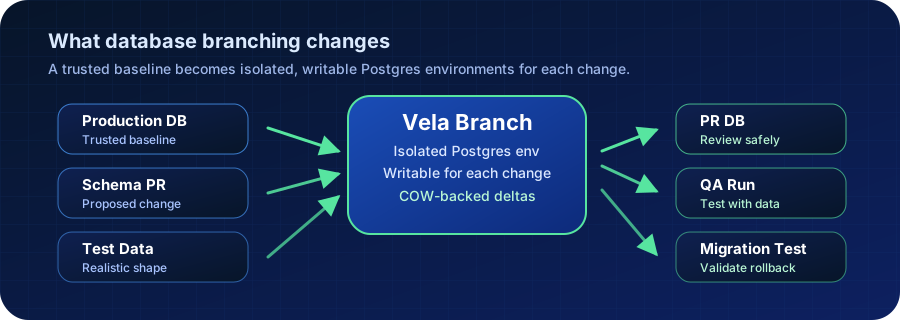
How Database Branching Works
Database branching starts from a known source database, usually production, a sanitized production copy, or another trusted baseline. The platform creates a writable branch that behaves like a normal Postgres database from the application’s point of view.
The branch should be isolated from the source. Developers can run schema migrations, seed test records, replay problematic queries, or validate application changes without writing back to the main database. When the work is done, the branch can be discarded, refreshed, or used as evidence that a change was tested against realistic data.
In storage-backed implementations, this often relies on copy-on-write behavior. Unchanged data remains shared with the baseline, while branch-specific changes are stored separately as the branch diverges.
Where Teams Use Database Branching
Database branching is most useful when a team has outgrown a single shared staging database. Shared staging environments tend to drift, accumulate test data, and become a coordination bottleneck. A branch-per-change workflow gives each team or pull request a cleaner boundary.
Common use cases include:
- creating a database branch for each pull request
- testing schema migrations before they reach production
- reproducing bugs against production-like data
- running QA suites without corrupting a shared environment
- validating analytics, AI, or ETL changes before promoting them
- giving support or incident teams a safe place to investigate data issues
Need production-like Postgres branches without staging database contention? Vela gives teams isolated database branches for pull requests, QA, AI experiments, and migration testing. See Vela database branching
Database Branching vs Clones vs Staging Copies
Database branching is related to cloning, snapshots, and staging databases, but the workflow goal is different. The useful comparison is not “which one copies data?” It is “which one makes change validation safe, fast, and repeatable?”
| Approach | How it works | Best fit | Common limitation |
|---|---|---|---|
| Shared staging database | One long-lived database used by many teams | Small teams with simple release flows | Data drift, coordination, and hard-to-reproduce failures |
| Logical dump and restore | Export and import schema/data into another database | Portable backups, migrations, one-off copies | Slow for large datasets and awkward for branch-per-PR workflows |
| Storage snapshot clone | Create a copy from an underlying storage snapshot | Infrastructure-led restore and clone workflows | Often lacks developer-facing lifecycle and governance |
| Vela database branch | Create an isolated, writable Postgres branch from a trusted baseline | PR databases, QA, migration tests, production-like development | Requires clear data access, cleanup, and promotion rules |
This is why database branching should be designed as a workflow, not just as a copy primitive. A branch is useful when teams can request it, name it, test against it, control access, and remove it safely.
How Vela Uses Database Branching
Vela treats database branching as a first-class Postgres platform workflow. Teams can create production-like branches for pull requests, QA runs, AI experiments, and migration rehearsals without waiting for a full logical dump and restore cycle.
The Vela model is intentionally Postgres-first. Applications still connect to a Postgres database, SQL behavior still matters, and concepts like WAL, MVCC, indexes, and transactions still apply. Vela adds the platform layer that makes realistic database environments faster to create and easier to govern.
That is especially useful for platform teams that want to standardize database workflows across development and QA without asking every team to maintain its own restore scripts, staging refresh process, and cleanup policy.
Operational Checks
Before adopting database branching as a standard workflow, verify the basics:
- define which teams can create branches and from which baselines
- decide whether branches use production, sanitized production, or synthetic data
- document branch retention, cleanup, and access-control rules
- test schema migrations and rollbacks against production-like data
- measure branch creation time and storage growth as branches diverge
- confirm CI and QA systems can create and destroy branches reliably
The goal is not to create more environments. The goal is to remove unsafe shared-state assumptions from database change management.
Related Vela Reading
Start with How Vela Works, Database Branching, Branch per PR, and the Vela articles library. For adjacent glossary terms, review Copy-on-Write (COW), Clone (Database Clone), PITR (Point-in-Time Recovery), and WAL (Write-Ahead Logging).