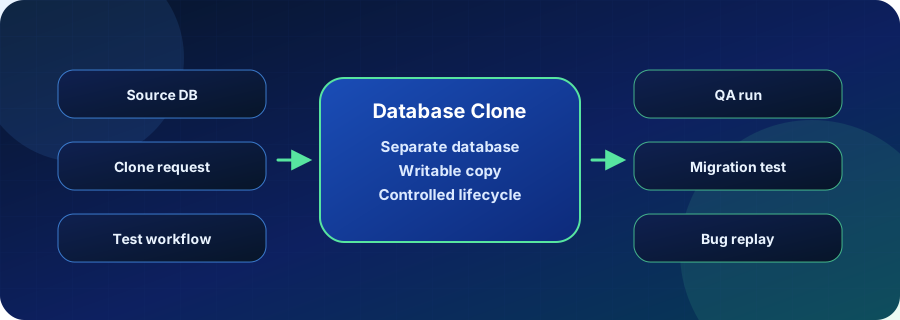
A database clone is a separate copy or branch of an existing database. In Postgres workflows, clones are most useful when teams need production-like data for tests, schema migrations, debugging, or QA without writing to the source database.
The important distinction is workflow. A clone created by a one-off restore can help with a single task, but a managed clone workflow helps teams request, use, govern, and remove database environments repeatedly.
How Database Clones Work
A database clone starts from a source database, backup, snapshot, or branch baseline. Once created, it should behave like a separate Postgres environment from the application point of view.
Depending on implementation, clone creation can rely on logical restore, physical restore, snapshots, or copy-on-write behavior. For product teams, the operational question is how quickly a clone can be created and how safely it can be used with production-like data.
Where Teams Use Database Clones
Clones are useful whenever a team needs realistic data without risking production. They are common in QA, support, release engineering, migration planning, and developer workflows that need to reproduce bugs against current data.
Common patterns include:
- running integration tests against a production-like dataset
- validating schema migrations before rollout
- giving QA an isolated database for a release candidate
- debugging a customer issue without changing production
- testing AI or analytics features against realistic relational data
Need Postgres clones that developers can actually use? Vela turns cloning into a repeatable workflow for isolated QA, migration, and pull request databases. See Vela database cloning
Database Clone vs Restore vs Branch
Clones, restores, and branches overlap, but they optimize for different operating models.
| Approach | What it creates | Best fit | Common limitation |
|---|---|---|---|
| Backup restore | A recovered database from backup media | Disaster recovery and audit drills | Usually slower and operationally heavier |
| Snapshot clone | A copy from infrastructure state | Infrastructure-led testing and recovery | May lack developer workflow controls |
| Database branch | A named, writable branch from a baseline | PR databases and repeatable QA | Requires branch lifecycle rules |
| Vela clone | A production-like Postgres environment with platform lifecycle | Developer, QA, AI, and migration workflows | Requires data access and cleanup policies |
How Database Clones Relate to Vela
Vela treats cloning as part of a broader Postgres platform workflow. A clone should not be a ticket-driven manual restore; it should be something teams can create, test against, govern, and remove as part of the development lifecycle.
That matters when multiple teams need separate environments from similar data. Vela helps turn cloning into a repeatable process rather than a fragile staging refresh ritual.
Operational Checks
Before relying on database clones, verify these basics:
- document the source baseline for each clone
- decide whether clones can use production, masked, or synthetic data
- define clone retention and cleanup rules
- test application behavior against the clone before production changes
- measure storage growth and write activity for long-lived clones
Related Vela Reading
Start with How Vela Works, Database Branching, Branch per PR, and the Vela articles library. For adjacent glossary terms, review Database Branching, Copy-on-Write (COW), Vela, BYOC (Bring Your Own Cloud).