Cardinality and row estimation sit at the center of every query performance problem that is not immediately obvious. When a PostgreSQL query is slow and the schema looks fine, the cause is usually the planner choosing the wrong strategy based on an inaccurate estimate of how many rows a filter or join will return.
The planner never actually executes a query to decide how to run it — it uses statistics gathered by ANALYZE to model the data distribution and estimate costs. When those statistics are stale, skewed, or missing cross-column correlations, the planner’s cost model breaks down.
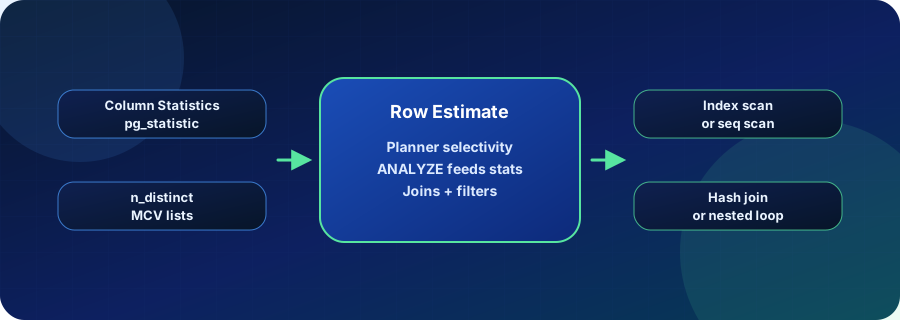
What Cardinality Means for PostgreSQL
The key statistics the planner reads from pg_statistic are:
- n_distinct: The estimated number of distinct values in a column. A value between 0 and 1 is treated as a fraction of total rows; a value greater than 1 is treated as an absolute count.
- correlation: How closely the physical storage order of rows matches the logical sort order of the column. High correlation makes index scans cheaper; low correlation makes them more expensive.
- MCV lists (most-common values): A short list of the most frequent values in a column and their frequencies. The planner uses these to estimate selectivity for equality filters.
- histogram bounds: Bucket boundaries covering the remaining, non-MCV distribution. The planner interpolates within these buckets to estimate range selectivity.
ANALYZE collects these statistics by sampling default_statistics_target * 300 rows from each table (default: 30,000). You can raise the statistics target for specific columns using ALTER TABLE ... ALTER COLUMN ... SET STATISTICS N to get more accurate estimates at the cost of longer ANALYZE runs.
Where Cardinality Estimation Goes Wrong
Three patterns account for the majority of bad estimates in production:
Correlated columns: PostgreSQL assumes columns are statistically independent. A filter on (state = 'CA' AND city = 'San Francisco') will be estimated as if the two predicates are unrelated, producing a much lower row count than reality. The fix is CREATE STATISTICS ... (dependencies) ON state, city FROM orders.
Partial or skewed distributions: A table where 90% of active rows belong to one tenant or date range causes the planner to misestimate filters that target the minority distribution. Partial indexes with matching WHERE clauses can help the planner reason about the subset.
Stale statistics after bulk loads: When a large batch insert adds millions of rows between ANALYZE runs, pg_statistic no longer reflects the actual data distribution. Autovacuum’s analyze threshold may not trigger fast enough for tables with infrequent bulk writes. Manual ANALYZE or reduced autovacuum thresholds solve this.
Test statistics fixes in a Vela branch at production scale before running ANALYZE in production. Try Database Branching
Why Row Estimation Accuracy Matters for Production Postgres
Estimation errors have compounding effects when queries involve multiple joins. A two-times error in an early filter estimate can become a hundred-times error at the output of a three-table join, because planner models multiply selectivity estimates together.
The most common consequences are:
- Wrong join strategy: The planner chooses a nested-loop join for what should be a hash join, because it thinks the inner table result will be small. At production row counts the nested loop becomes orders of magnitude slower.
- Index vs sequential scan tipping point: The planner will switch from an index scan to a sequential scan when it estimates enough rows that random I/O becomes more expensive than a full table scan. If the estimate is wrong, it picks the wrong side of that threshold.
- Memory allocation: Hash joins and sort operations allocate
work_membased on estimated row counts. An underestimate causes mid-query spills to disk that the planner did not anticipate.
Identifying the worst estimate mismatches in EXPLAIN (ANALYZE, BUFFERS) output is the most direct path to improving query performance without changing the query itself.
Statistics Approaches Compared
| Approach | Coverage | Complexity | Best use case |
|---|---|---|---|
| ANALYZE only | Per-column, independent statistics | Low — runs automatically via autovacuum | Most tables with low column correlation |
| Extended statistics (dependencies) | Cross-column correlation tracking | Medium — requires CREATE STATISTICS per column pair | Filters on correlated column pairs (city + zip, status + date) |
| Manual statistics hints (ALTER COLUMN SET STATISTICS) | Higher-resolution histograms for a specific column | Low — one ALTER per column | Skewed distributions, high-cardinality columns |
| Partial indexes with WHERE clause | Separate statistics for a data subset | Medium — index must match query predicate exactly | Queries targeting a minority of rows (active records, recent dates) |
How Cardinality Estimation Relates to Vela
Fixing a cardinality problem in production requires running ANALYZE on a live table, which can affect query performance during the statistics collection window. It also sometimes requires testing multiple CREATE STATISTICS definitions to find the one that actually closes the estimate gap.
Vela branches let teams apply statistics fixes against a production-like copy of the data — the same row counts, the same data distribution — and verify the plan change with EXPLAIN ANALYZE before touching production. That workflow applies equally to extended statistics definitions, raised column statistics targets, partial index experiments, and plan_cache_mode tuning.
Operational Checks
- Run
EXPLAIN (ANALYZE, BUFFERS)and compare estimated versus actual rows at each node. - Check
pg_statisticfor columns with filters that show the largest estimate gaps. - Raise
default_statistics_targetor use per-column targets for high-cardinality or skewed columns. - Use
CREATE STATISTICS ... (dependencies)for correlated column pairs. - Confirm autovacuum analyze thresholds are low enough to keep statistics current after bulk loads.
Related Vela Reading
Start with How Vela Works, Database Branching, Branch per PR, and the Vela articles library. For adjacent glossary terms, review EXPLAIN ANALYZE, Query Execution Plan, and Autovacuum and Maintenance.