Autovacuum is the background process that keeps PostgreSQL tables healthy over time. Every UPDATE and DELETE creates dead row versions that must be periodically reclaimed — autovacuum handles this automatically, but its default configuration is conservative. On write-heavy tables, autovacuum often needs explicit tuning to keep pace.
The default autovacuum settings work well for moderate workloads, but production databases with high write rates or large tables often accumulate dead tuples faster than autovacuum’s default thresholds trigger maintenance. Left untuned, the result is silent bloat — tables that grow larger than they need to be, index scans that get slower, and eventually forced emergency vacuums that spike I/O at the worst possible time.
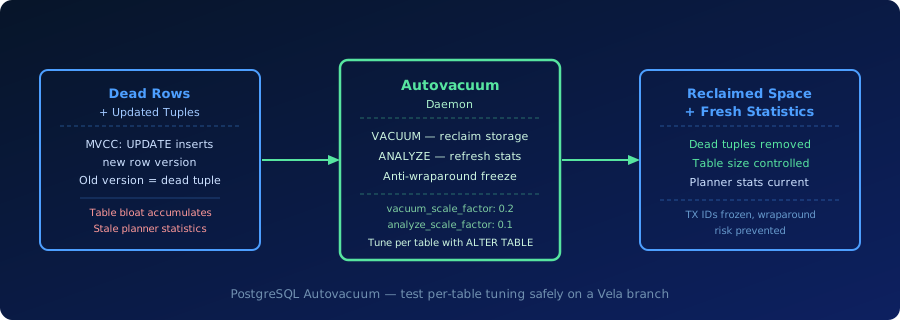
What Autovacuum Does
Autovacuum runs three distinct maintenance operations:
VACUUM (storage reclamation). Dead rows left behind by MVCC updates and deletes are marked as reclaimable but remain on the page until a VACUUM pass processes the table. VACUUM identifies these dead tuples, marks their storage as free for reuse, and where possible removes index entries pointing to them. It does not shrink the physical table file unless VACUUM FULL is run (which requires an exclusive lock and is rarely appropriate on live production tables).
ANALYZE (statistics refresh). Autovacuum also triggers ANALYZE on tables that have changed significantly. Fresh statistics are what the query planner uses to choose between scan types and join strategies. When autovacuum falls behind on ANALYZE, the planner works from stale statistics and is more likely to pick poor execution plans.
Anti-wraparound vacuum. PostgreSQL transaction IDs are 32-bit integers. When a table’s oldest transaction ID approaches the 32-bit limit (roughly 2 billion transactions), PostgreSQL triggers a forced vacuum to freeze old row versions and prevent transaction ID wraparound — a scenario that would make all historical rows invisible. Autovacuum handles this automatically, but tables with very old transactions will see forced emergency vacuums that cannot be deferred.
The two primary threshold parameters that control when autovacuum triggers are:
autovacuum_vacuum_scale_factor— fraction of live rows that must be dead before autovacuum fires (default0.2, meaning 20%).autovacuum_analyze_scale_factor— fraction of rows changed before autovacuum runs ANALYZE (default0.1).
On a table with 10 million rows, a 20% threshold means 2 million dead tuples must accumulate before autovacuum triggers. For high-churn tables, this is often far too conservative.
Where Autovacuum Problems Appear in Practice
Write-heavy tables. Tables that receive high UPDATE or DELETE volume — order status tables, event queues, session records — accumulate dead tuples rapidly. With default settings, autovacuum may run but never fully catch up, leading to persistent bloat and increasingly long vacuum cycles.
Long-lived transactions. An open transaction prevents autovacuum from reclaiming dead rows that are visible to that transaction. A long-running reporting query or an idle transaction left open by an application can pin a dead row horizon across the entire table and block meaningful cleanup.
High-churn lookup tables. Small reference tables with frequent updates — configuration tables, feature flags, rate limit counters — can have high dead tuple percentages relative to their live row count. Autovacuum’s scale factor thresholds are percentage-based, so a table with 1,000 rows needs only 200 dead tuples (at 20%) to trigger vacuum — but if updates are continuous, even that threshold may not keep pace.
Reproduce autovacuum bloat in a Vela branch to test per-table tuning before applying to production. Try Database Branching
Why Autovacuum Matters for Production Postgres
Table bloat. When autovacuum falls behind, dead tuples accumulate on data pages. Sequential scans read every page including those full of dead tuples, slowing query throughput. Table bloat also makes backup and restore operations slower because the physical table size is larger than the live data requires.
Index bloat. Index pages also accumulate references to dead heap rows. Until VACUUM processes the table and removes stale index entries, indexes grow larger than necessary. Oversized indexes use more memory for caching, produce slower scans, and take longer to update on each write.
Transaction ID wraparound risk. PostgreSQL will begin warning — and eventually refusing writes — as a table’s oldest transaction ID approaches the wraparound limit. Emergency anti-wraparound vacuums are triggered automatically but can produce significant I/O load at unpredictable times. Proactive per-table tuning prevents emergency scenarios from arising.
Autovacuum problems typically manifest as:
- tables growing significantly larger than expected for their live row count
- rising dead tuple counts visible in
pg_stat_user_tables - query plans that were fast becoming slower over weeks without schema changes
- PostgreSQL log warnings about transaction ID age approaching limits
Manual VACUUM vs Autovacuum vs Aggressive Tuning
| Approach | How It Works | When to Use It |
|---|---|---|
| Manual VACUUM | Run VACUUM or [VACUUM ANALYZE](/glossary/vacuum/) explicitly on a table | After bulk loads, before restoring stale statistics, or as a one-time cleanup after a bloat incident |
| Default autovacuum | Background process triggers at 20% dead tuples (VACUUM) and 10% changed rows (ANALYZE) | Adequate for moderate-write tables with fewer than a few million rows |
| Aggressive per-table tuning | Lower scale factors and thresholds on specific high-churn tables via ALTER TABLE storage parameters | Required for large high-write tables where default thresholds allow too many dead tuples to accumulate |
| VACUUM FULL | Rewrites the table to reclaim all bloat and compact storage; requires an exclusive [table lock](/glossary/lock/) | Last resort for severe bloat on tables that can tolerate downtime; not appropriate for routine maintenance |
How Autovacuum Relates to Vela
Vela runs standard PostgreSQL, so autovacuum operates the same way it does in any Postgres deployment. The autovacuum daemon, pg_stat_user_tables, ALTER TABLE storage parameters, and the transaction ID wraparound mechanism all work as documented.
The Vela-specific value is in the testing workflow. Per-table autovacuum tuning is a low-risk configuration change, but validating that it actually reduces dead tuple accumulation requires reproducing the real write pattern. A Vela branch lets teams run a representative workload, observe dead tuple growth rates via pg_stat_user_tables, apply per-table settings, and confirm the tuning has the expected effect — without running the experiment on the production database.
For teams managing high-write Postgres workloads, this connects to database branching and MVCC as the underlying reason dead rows accumulate in the first place. See How Vela Works for the broader platform model.
Operational Checks
Before relying on autovacuum configuration in a production workflow, verify the basics:
- Review
pg_stat_user_tablesfor tables with highn_dead_tuprelative ton_live_tup. - Check
last_autovacuumandlast_autoanalyzetimestamps to confirm autovacuum is running and keeping pace. - For high-churn tables, lower
autovacuum_vacuum_scale_factorandautovacuum_analyze_scale_factorviaALTER TABLE. - Monitor transaction ID age in
pg_stat_user_tables.age(relfrozenxid)and address tables approaching the wraparound threshold.
Related Vela Reading
Start with How Vela Works, Database Branching, Branch per PR, and the Vela articles library. For adjacent terms, review MVCC (Multi-Version Concurrency Control), Query Execution Plan, Extended Statistics, and Database Branching.