When we started building Vela, we had a very specific, and slightly stubborn goal: A new Postgres environment should be ready so fast that it doesn’t feel like “provisioning”. We didn’t mean “fast for a VM boot,” we meant as fast as possible. So fast that platform engineers talk about instant delivery, yet with full isolation.
That said, our three constraints were:
- Full isolation between databases with hard boundaries, not the “namespace-level isolation.”
- Fully resilient against noisy neighbors with hard resource limits on CPU, RAM, and disk activity.
- Kubernetes-native scalability with automatic placement and interruption-free replacement (live-migration).
While Vela’s initial goal sounds easy and straightforward, it was annoyingly hard to hit. Every database (branch) in Vela gets strong isolation and the ability to dynamically and independently scale. It feels like a database on Kubernetes should feel, but with the isolation guarantees of a virtual machine.
This post is the story of how we got from there to sub–10-second boots, while keeping full isolation between databases and scaling behavior that works naturally inside Kubernetes. Along the way, we learned a lot about KubeVirt’s model (and its sharp edges), why autoscaling VMs is subtly different from autoscaling pods, and why a tiny custom OS image can be a bigger performance lever than almost any tuning flag.
Why We Went With Virtual Machines
At the beginning, we picked VMs for one pragmatic reason: VM live migration is a solved problem. It’s supported by most hypervisors and is still meaningfully ahead of container live migration in maturity. We did look at container migration work (e.g., zeropod), but it didn’t line up with our constraints. While it handles scaling (even down to zero) smoothly, it did not meet our requirement of uninterrupted live migration.
Kubernetes was also non-negotiable. For most platform teams, Kubernetes is “the substrate,” and everything else is expected to integrate into its scheduling, observability, and operational lifecycle.
So, we did the obvious thing: run Postgres inside VMs that are still controlled as Kubernetes objects. KubeVirt is designed precisely for that: it extends the Kubernetes API with VM types and runs the VM “payload” via a pod that launches QEMU/KVM.
Initial Attempt: KubeVirt, Docker, and Frustrating Boots
Virtual machines on Kubernetes? That’s KubeVirt. Like everyone else, that was our answer as well. How hard can it be?
Our first iteration booted in ~2 minutes on a good day and up to ~5 minutes on a bad day. Instant enough, right? 🫣
The VM boot process timings weren’t even that bad. However, booting the VM was just the beginning. We were starting Docker (Compose) in the VM and then pulling and loading multiple container images per branch, essentially all the services for each branch (Postgres, PGBouncer, PostgREST, …). Docker Hub throttling and “image pull lottery” turned out to be a brutal source of tail latency.
The boot process was harsh:
- Kubernetes creates the KubeVirt VM resources
- The VM resource boots Qemu
- The guest OS boots
- The Docker service becomes available
- Docker downloads the individual container images
- Docker starts the containers one-by-one, according to the dependency graph
- Containers start up and become healthy
- We mark the branch as active (healthy)
We knew downloading the images every single time a VM starts up wasn’t optimal, but we didn’t expect it to be this bad. The main issue is how Docker handles image downloads and container startups. Mainly, it downloads all images first, and then starts them according to the container dependency graph. One large or slowly (throttled) image, and you’re out. With every additional image, the chance of hitting a bad day increases.
Overall, we identified three components that amplified latency, listed in order of impact (high to low):
- Image pull and registry throttling to make branch service images available.
- The two-level startup with the VM and Docker containers.
- Additional setup steps, such as registering the DNS name, provisioning a new disk, running Postgres’ initdb, and similar.
Let’s Pre-Cache Docker Images
First, we needed to get rid of the always-download problem. If your boot path includes “downloading dependencies,” you don’t have boot time. You have a probability distribution.
We were building a VM image, so why wouldn’t we “just” pre-download all required container images during the build process?
Said and done. Meaning, we adjusted the build process to include a step that downloads all required Docker images and bundles them into the final virtual machine boot image.
This worked great. The biggest source of boot-time variability was gone. We were at a pretty consistent 90-100-second basis. A lot of time was still spent booting the Linux image and waiting for the Docker service to become available before finally starting our actual branch services. But this was good enough for a first shot. We knew there was potential for optimization by not booting just a typical Linux image, but making some optimizations to the boot-up procedure.
Why Docker?
One of the lingering questions is, “Why the fork did you use Docker inside the VM?”
The short answer is just one word: convenience.
The long answer is: the convenience of faster iteration cycles by using different Docker images and testing different potential service options (like Pgpool-II, PGBouncer, and others).
We needed the chance to experiment without rebuilding the virtual machines, and Docker was the perfect solution at the time. It would also make database upgrades really easy. In Postgres, for major version upgrades, you need two Postgres versions installed: the new version and the current one. With Docker, this would be a single download away. Use the new version’s base image and quickly download the old version after bootup. Run the migration and remove the old version’s container image. Done.
Anyhow, before we could get back to the other latency factors, we found some other issues creeping up on us.
When KubeVirt Started To Fail On Us
We want to be clear, none of the following issues were a simple “KubeVirt is bad.” In fact, KubeVirt solves a very hard problem and does so in the most Kubernetes-way possible.
However, our target behavior (fast, frequent, elastic, database-shaped VMs) stressed different parts of the system. It was not the typical “long-lived” VM that never changes use case. KubeVirt is awesome if you want the convenience of Kubernetes and the typical lifecycle and isolation of a virtual machine. We, on the other hand, diverged from this state, and it started to show.
Scaling a Virtual Machine Is Not Scaling A Pod
The first friction point was that VM resource scaling for CPU and RAM isn’t rare. We wanted to dynamically scale up and down as often and as fast as possible. Potentially, scale-to-zero included.
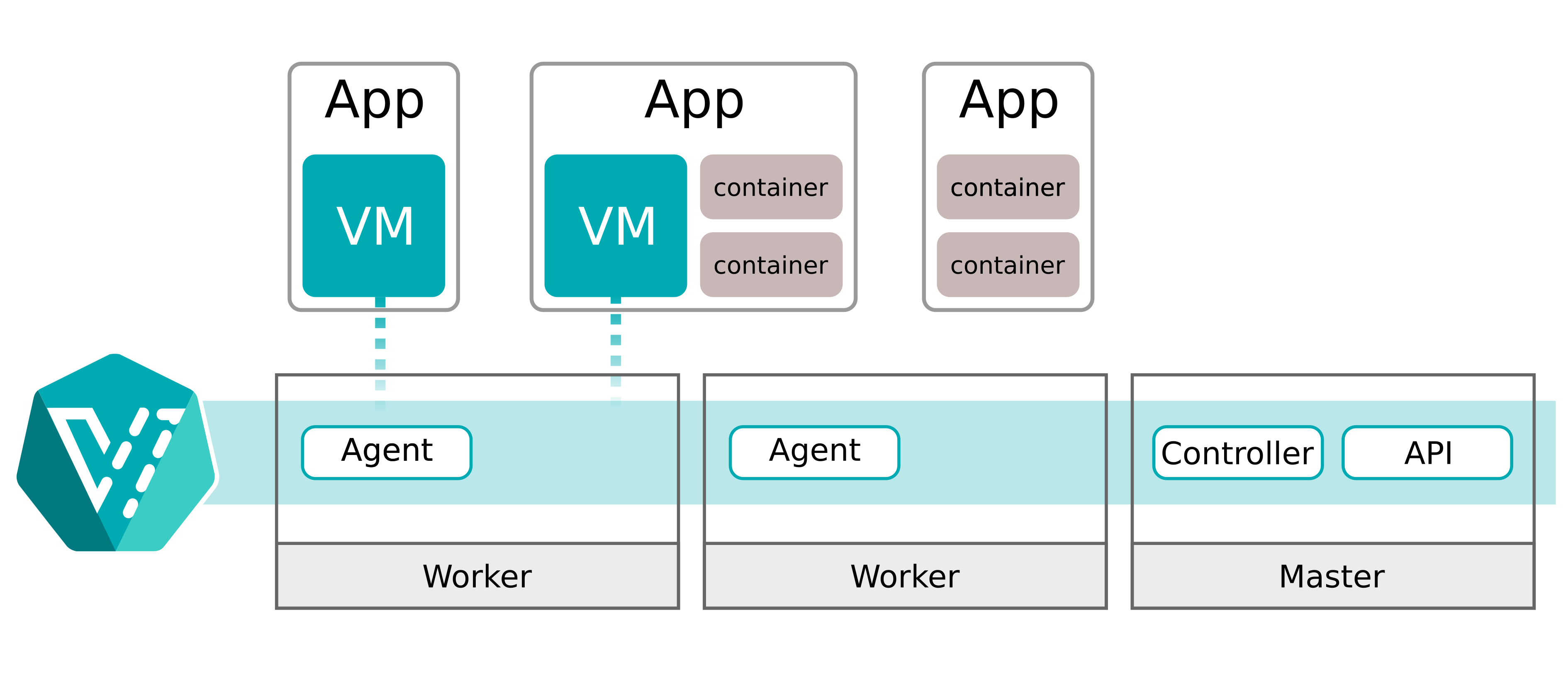
In KubeVirt, those changes trigger an immediate live migration. Even if there are enough resources available on the current host. The main pain point is that live migration will always migrate the VM to another Kubernetes worker. While live migration's impact on performance is limited, constantly moving the virtual machines wouldn’t cut it.
“Current hotplug implementation involves live-migration of the VM workload.” KubeVirt Authors, “Memory Hotplug” documentation (KubeVirt.io)
For a typical VM lifecycle, this design decision definitely makes a lot of sense. But for us, it meant that every “resize” becomes a “moving the world,” cascading into network complexity and database connection sustainability.
We needed a solution that only live-migrated a virtual machine when no resources were available and enabled local up- and downscaling for CPU and RAM.
Live migration and TCP sessions are a brutal combination
We also ran into a harder truth: live migration is only “seamless” if your networking stack and migration pipeline preserve the invariants your workload assumes. Postgres clients are not forgiving about long stalls.
Databases are latency-sensitive and connection-oriented. Our internal tests showed that even the smallest discontinuities become visible quickly during sustained connection tests. Suggested solutions like passt reduced the burden, but we still saw connections break under moderate to heavy pgbench load.
And it seems we weren’t alone. KubeVirt has public issues and community discussions around post-migration networking issues. For example, there is a long-standing report that after migration, connectivity can break at the masquerade interface. Other community members have described losing connections because the underlying pod/network identity changes during migration.
We needed some real overlay networking.
Dual-level resource accounting: Pod vs VM
Another gotcha: resource control happens at multiple layers in the stack.
- The Virtual Machine level is what QEMU thinks the VM has available.
- The Pod/Cgroup level is what Kubernetes enforces on the virt-launcher (QEMU) pod.
In our experiments, we found that CPU and memory allocations needed to be managed effectively at the VM and pod levels. Just updating the pod level caused out-of-memory issues in the VM. This is related to the scalability issue mentioned above.
To mitigate parts of the issue and to enable live resizing, we had to work around KubeVirt and use libvirt to update the VMs directly. We had to be careful not to break the system, since a single reconciliation event on a KubeVirt virtual machine resource would invalidate any “manual” updates to the VM.
We needed a safer way to do things.
Time To Move On
We hit multiple situations where we needed workarounds that didn’t fit neatly into the supported API surface, and the next reconciliation would undo them. Patching KubeVirt would have involved a lot of work, and we didn’t want to carry a long-lived fork of such a central project just to keep moving.
We asked ourselves:
- “Is KubeVirt a good virtualization API for Kubernetes?” Yes, it is.
- “Is KubeVirt a good abstraction for our branches lifecycle and scaling model?” We think no.
So we did what open-source builders do. We looked for another approach that better matched our requirements, and there were two basic options: finding a better (existing) solution or writing everything from scratch, purpose-built.
Our initial thought was to build our own abstraction on top of libvirt or QEMU directly. But while looking into the size of the KubeVirt source and designing out the features, we realized the scope ahead of us.
Marrying a virtual machine to Kubernetes is hard work. Too many concepts diverge and need to be reintegrated. We got scared. We decided to first search for other solutions. Something closer to what we needed. And we got lucky.
The Pivot: Adopting Neon’s Autoscaling
The better approach is to look for another solution if you can find one that better meets your requirements. And we did.
The approach was simple and obvious (when you think about it). Look for adjacent companies and their solutions. Luckily for us, there are many databases out there. Many open-source. Many Postgres(-related).
When we found Neon’s Autoscaling project, we also realized we weren’t the first to run into the above limitations. They faced many of the same issues and chose to write their own solution to the problem. Neon’s approach was unapologetically database-shaped. It was designed around vertical autoscaling of Postgres inside K8s-managed micro-VMs (QEMU-based). They also solved the tricky part: “don’t break TCP sessions when you change resources or move the workload.”
The most interesting part of Autoscaling is how scaling decisions are taken and how scaling works.
First, Autoscaling uses Cgroups to scope the resources (CPU and memory) for usage reporting. To capture the usage of a “host” (guest VM), it uses metrics collected through Prometheus. Every few seconds, the current usage is evaluated against potential up- or downscaling events. Furthermore, the agent inside the virtual machine can proactively request scaling decisions, but may be vetoed.
Since Autoscaling uses QEMU under the hood, CPU and memory can be hot-plugged. Meaning, at runtime, CPU cores are attached and detached from the virtual machine as required. Memory works similarly, using virtio-mem devices that can be added or removed at runtime. The Linux kernel moves to-be-deleted memory regions to free a virtio-mem device before detaching it (similar to how memory ballooning works).
“We want to dynamically change the amount of CPUs and memory of running Postgres instances, without breaking TCP connections to Postgres.” Neon Autoscaling README (GitHub)
Autoscaling Components
Autoscaling itself is a set of components that work together to enable serverless Postgres in Kubernetes.
- A controller (neonvm-controller) to manage the virtual machine resources (CRDs).
- A scheduler that evaluates node capacity and makes VM placement and replacement decisions.
- A per-node agent (daemonset) that collects VM resource usage and reports it.
- A VM monitor that runs alongside the workload and reports usage via Prometheus, with cgroup-specific configuration.
- A VXLAN manager, ensuring sustained connectivity with virtual network interfaces and overlay networking (together with Flannel).
- A runtime image that wraps the VM. It makes the VM image available, starts QEMU, handles DHCP/port forwarding, and manages mounts.
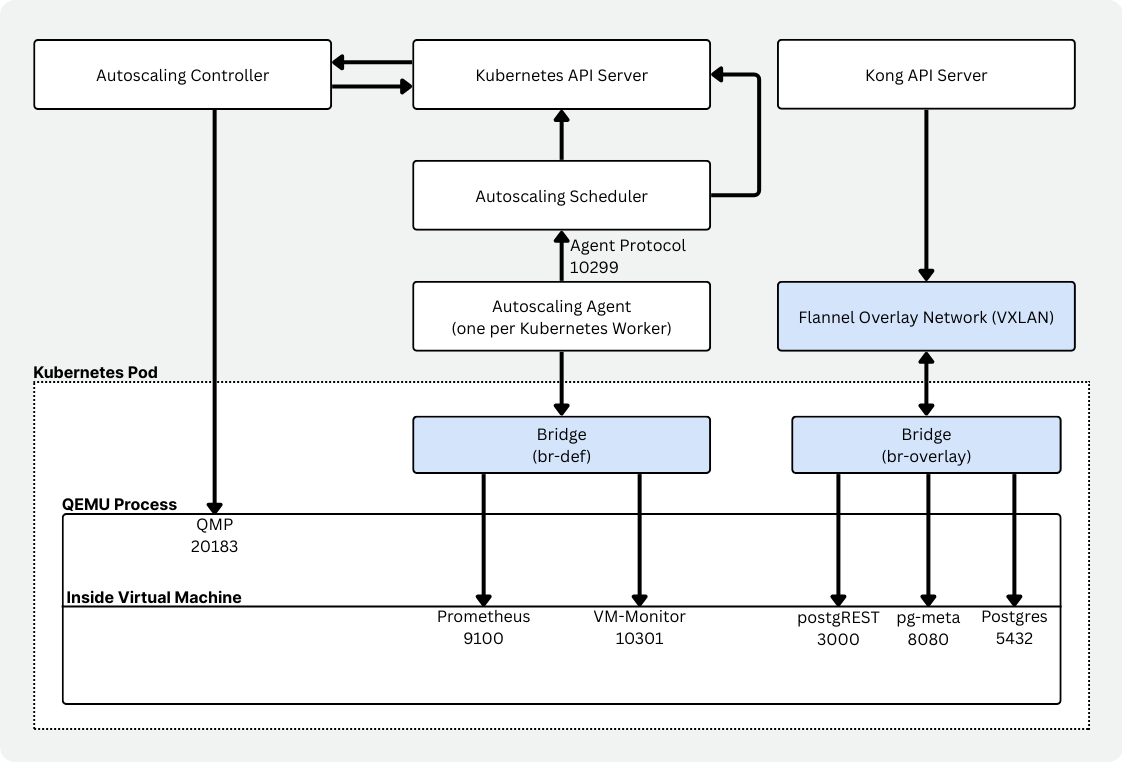
You can see the same conceptual split: a custom scheduler, an autoscaler-agent per node, and a vm-monitor that can respond immediately to memory pressure. A much better match for Vela.
Thank you to the Neon team behind Autoscaling for the amazing work!
Changes were still needed
But as much as Autoscaling already hit the spot, there were some “rough edges” due to the difference in how Neon and Vela are implemented.
First, with simplyblock as the main underlying storage, we needed support to attach one or more PVCs (Persistent Volume Claims) to the virtual machine.
Then we wanted a way to limit CPU and RAM usage without removing the option to live-update the limits. Unfortunately, QEMU needs to know the maximum CPU and RAM that can be attached at any given time. We needed those values to be much higher than we expected people to scale to. So, we extended the decision-making process with a soft limit. Current VMs have a hard limit of 128 vCPUs and 256 GB of memory. The soft limit, however, describes the current maximum scaling factors, like 8 vCPUs or 16 GB of memory. Requests going above the soft limits are declined.
Last but not least, we added a simple PowerState which enables us to start and stop the virtual machine by simply updating the value in the CRD. Pure convenience.
Winning at Boot-Time: Killing “Docker-in-the-VM”
Now that Autoscaling solved a big chunk of the lifecycle and scaling friction, it was time to get back to the real issue at hand. Boot time. The real breakthrough in boot time came from being honest with ourselves. What we were doing at startup was just stupid. We chose convenience for us over the users' experience. We were booting a general-purpose distro, then booting Docker, then orchestrating multiple services via container images. So we removed the entire inner container layer.
VelaOS: A Buildroot-based custom Linux kernel and rootfs
We moved to a Buildroot-based custom Linux image. Buildroot itself is a framework for building Linux kernels and a minimal root filesystem. Initially designed for embedded devices, it supports read-only filesystem images, device updaters, and more.
While you might not have heard about Buildroot itself before, it’s actually a widely used system. Better known users are OpenWRT, Home Assistant OS (HAOS), as well as embedded device manufacturers like Google Fiber. Buildroot is known for its minimal-size root filesystems.
Switching to Buildroot gave us some additional quick wins apart from just getting rid of Docker:
- The boot process became deterministic by using inittab as the base init system to control exactly what gets started and when.
- No more Docker pulls, as all services are integrated into the boot image.
- Boot speed since we’re not using a general-purpose operating system image with an optimized Linux kernel.
- Reproducible builds with every component being pinned to a specific version or commit and checksum, ensuring that only unmodified components are built.
On the other hand, we lost velocity. Buildroot, as a build framework, builds most components of the final image itself. That way, it can achieve incredibly small disk images at the cost of build time. Thanks to CCache and other optimization techniques, it is still manageable, though.
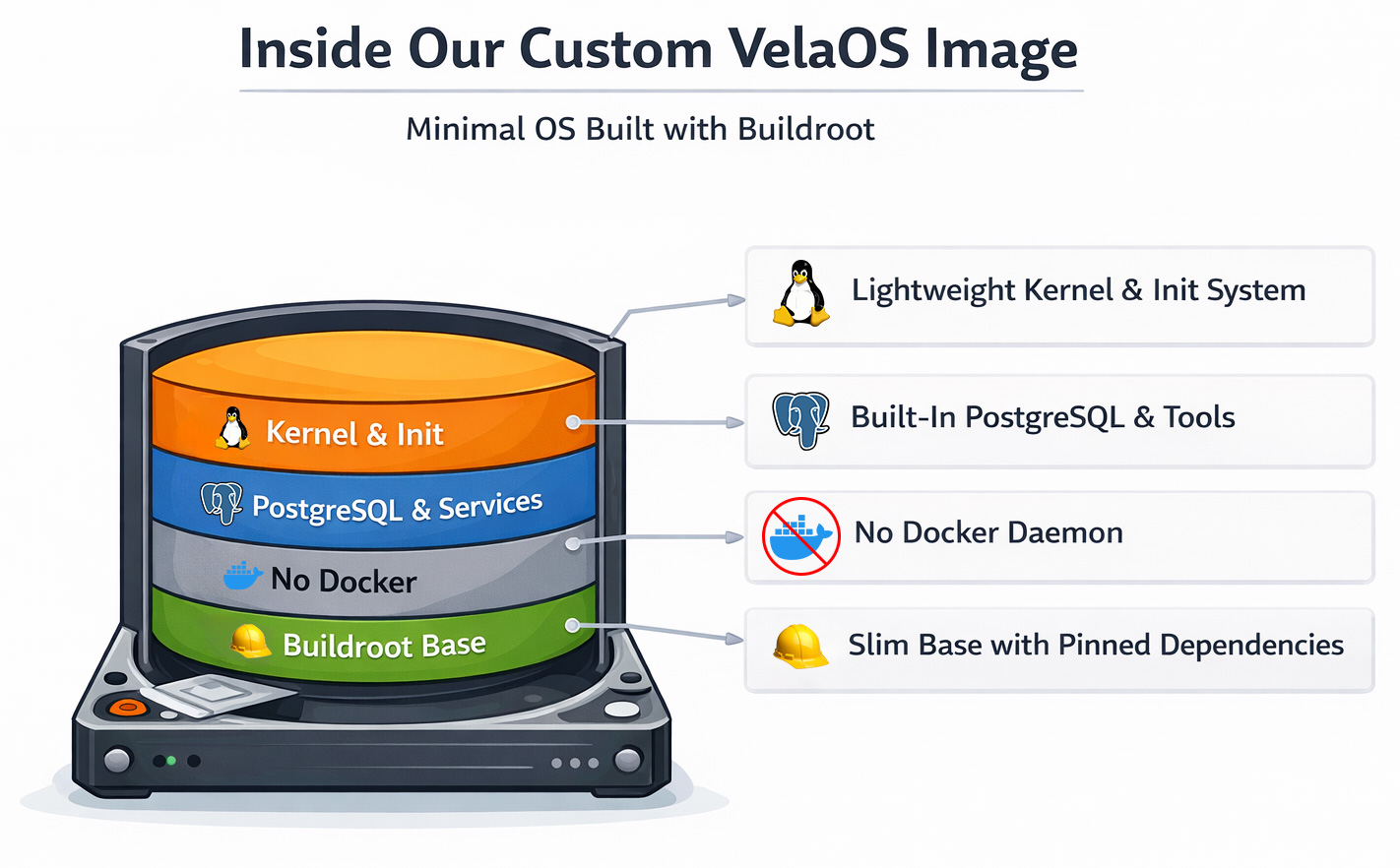
The resulting boot path is simple:
- Kubernetes schedules the VM pod (via the autoscaling scheduler decisions).
- The runtime starts QEMU with our VM image.
- The guest boots a minimal OS with services already installed.
- Postgres and the supporting branch services come up immediately (no downloads).
There is still room for improvement. But at the moment, we believe <10 seconds is good enough. Vela’s value is “branches appear fast, behave consistently, and isolate hard.”
Isolation and Scalability: Why This Still Feels Like Kubernetes
A reasonable concern is: “If you left KubeVirt and started running custom VM plumbing, did you lose the Kubernetes ergonomics?”
In practice, we kept the beloved parts of Kubernetes. We still have declarative control through CRDs controllers that reconcile the desired state. Scheduling is implemented through Kubernetes, with placement being influenced by the autoscaling scheduler and agent. Node-level resource constraints provide required evidence for placement, scaling, and migration decisions based on real node capacity and actual VM usage. And finally, isolation boundaries are enforced with each database branch being its own VM boundary.
All this while preserving the possibility of full live-migrating a Vela branch from one Kubernetes worker to another, without destroying existing Postgres connections.
Fast boot is also a control-plane feature
But sub-10-second boot time isn’t just about the user experience. It also changes what and how you build:
- Vela can scale up more aggressively because adding capacity is cheap, horizontally with more virtual machines, and vertically with live-resizing of VM limits.
- Vela can treat environments as ephemeral because the cost of recreation is low and storage and compute are completely separated.
- Vela can absorb failures by replacing the VM rather than repairing it.
That’s the shape of a system that can eventually serve users, agents, and CI workflows without making the user wait.
Lessons Learned: It’s Always More Complicated Than You Think!
“VMs vs containers” is not the debate, but boot path determinism is.
We started with VMs for good reasons (migration maturity, strong isolation), but our worst delays came from our own love for convenience and fast iteration. The Docker startup plus image pulls. The moment we removed “pull images at boot,” time-to-ready stopped being a gamble.
Kubernetes reconciliation is friend and foe.
If you find yourself “working around the reconciler,” treat it as a sign that you’re outside the intended extension model, and either move closer to supported patterns or pick a substrate that matches your control needs.
The fastest optimization is most commonly to remove stuff.
Just like the fastest code is the code that’s never executed, the fastest optimization is to remove unnecessary components. In our case, eliminating Docker Compose and container image pulls altogether removed minutes of variability.
Live migration is not a single feature, but a whole product surface.
KubeVirt and Autoscaling approach migration very differently. While in KubeVirt, almost every change or CPU or memory allocation ends up in a live migration, Autoscaling tries to do as much as possible on the existing VM instance, but falls back to migrating when physical resources become scarce. The other big difference is a stable networking identity achieved by using an actual overlay network rather than hacks on the Kubernetes network plane. If your workload is database-like, the “it migrated” event must be invisible to clients, or you will spend your life fighting reconnect storms and tail latency.
Minimal OS images aren’t just about speed. They reduce operational entropy.
A small, purpose-built image has fewer moving parts. That means fewer surprising interactions, fewer background daemons doing “helpful” things, and a smaller debug surface when something goes wrong. With VelaOS, based on Buildroot, we also achieved reproducible builds and an option to certify exactly what’s in the VM at any point in time (except the data).
Don’t be scared to be scared. Sometimes it leads to great outcome.
When we investigated building our own KubeVirt alternative, the scope of the task was scary. Scary enough that we put in the time to research other potentially existing solutions. That brought us to Autoscaling. And we’re glad we were scared.
KubeVirt is doing important work for the Kubernetes ecosystem.
Without KubeVirt taking the first steps toward bringing virtual machines to Kubernetes, we might not be here today. It’s worth saying explicitly that KubeVirt is doing important work for the ecosystem. Even where we hit limitations, the project is actively evolving. For example, KubeVirt’s own community is tracking enhancements around migration targeting and resize coupling, as shown in issues like #15625. And KubeVirt continues to document real-world integrations, like running alongside Cluster Autoscaler in cloud environments.
Where we want to go next
We don’t see this as “KubeVirt vs Neon Autoscaling.” There are multiple valid approaches to running VMs on Kubernetes, and the best choice depends on your workload shape.
KubeVirt is a powerful, general virtualization layer for Kubernetes, and we still follow its progress closely.
For Vela’s primary goals, such as fast ephemeral database branches with strong isolation, we needed a control plane and runtime path that was unapologetically optimized for databases.
Neon’s Autoscaling provided the right foundation, and Vela OS made boot time predictable.
If you’re building something in this space, we’d love to chat about your experiences, decisions, and additional edge cases. Especially around networking, migration behavior, or VM image design.
In the near future, we’ll start to upstream the improvements we’ve made. We believe in a healthy open-source ecosystem and want to share the changes rather than keep them private.
If you want to experience and test our Vela Postgres instances, create your free account at https://demo.vela.run. Vela is fully open source and intended for self-hosting in your own data center or private cloud. At the moment, we’re cleaning up the codebase, fixing remaining bugs, and implementing the user-facing installation procedure.